
The Signet Team brings together engineers, consultants, and technical staff from Signet CS — a company that has been helping businesses …
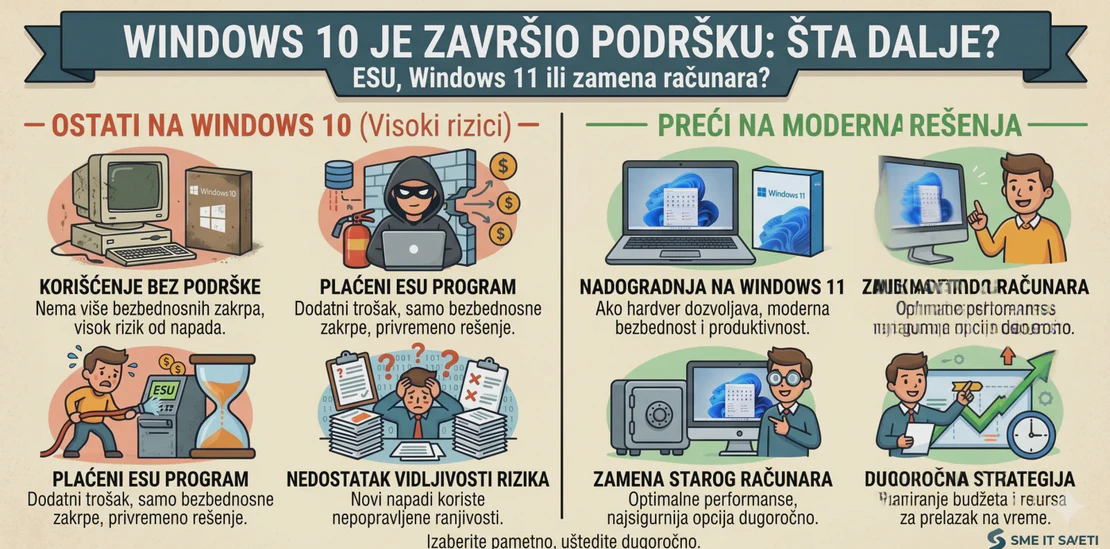

Windows 10 Support Has Ended: ESU, Windows 11, or Replacing Computers?
Windows 10 was the standard in business environments for many years. Many companies still use it because it is stable, familiar to users, and compatible with existing applications. However, Microsoft officially ended support for Windows 10 on October 14, 2025. After that date, Microsoft no longer provides standard technical support, feature updates, or security updates for Windows 10 computers.
Windows 10 computers will not stop working. But over time, they will become a greater security and operational risk.
What Does End of Support Mean?
End of support does not mean the computer will no longer turn on or that applications will immediately stop working. Users can continue using Windows 10, but without regular security updates, the system becomes more exposed to new vulnerabilities, viruses, malware, and attacks.
For a home user, this is inconvenient. For a company, it can be a serious risk.
A computer in accounting, sales, administration, or management often has access to e-mail, documents, banking applications, business software, and client data. If such a device remains unprotected, the problem is not only technical — it is a business risk.
Option 1: Upgrade the Existing Computer to Windows 11
The best option, when possible, is to move to Windows 11. Microsoft states that the upgrade is free for Windows 10 computers running version 22H2 that meet the minimum hardware requirements for Windows 11.
Before upgrading, you should check:
- whether the computer supports Windows 11,
- whether it has TPM 2.0 and Secure Boot,
- whether business applications are compatible,
- whether drivers exist for specific devices,
- whether memory or disk upgrades are needed,
- whether a valid backup exists before migration.
For some computers, the upgrade will be simple. For others, it will be uneconomical or technically impossible.
Option 2: ESU as a Temporary Solution
Extended Security Updates, or ESU, are intended for organizations that must continue using Windows 10 for some time. Microsoft states that ESU for organizations costs USD 61 per device for the first year, that the price doubles each following year, and that the program can last for a maximum of three years. ESU is purchased by year, not for a few months, and if the purchase is delayed until the second year, the previous year must also be paid because ESU licenses are cumulative.
It is important to understand that ESU is not modernization. It does not bring new features, does not solve the problem of outdated equipment, and does not include standard technical support. ESU is only a way to gain extra time until migration is completed.
That is why it should be used selectively: for computers that must remain on Windows 10 because of a specific application, device, or temporary business requirement.
Option 3: Replacing Computers
If a computer does not support Windows 11, is several years old, has a slow disk, too little memory, or causes frequent problems, replacing it is often a better decision than trying to extend its lifecycle.
An old computer may appear to be the cheaper option, but in practice it often means slower work, more interventions, higher risk of failure, and more difficult user support. If ESU is also being paid, the calculation may quickly show that replacement is the more rational choice.
For companies, it is especially useful to create an inventory of computers and divide them into three groups:
- computers ready for Windows 11,
- computers that will temporarily remain on Windows 10 with ESU,
- computers that should be replaced.
This approach allows a planned migration, without panic and without unnecessary costs.
Do Not Forget Applications, Data, and Users
Operating system migration is not just installing Windows 11. Business applications, server access, printers, scanners, VPN, Microsoft 365, antivirus, backup, user rights, and local data all need to be checked.
User workflow must also be planned. It is not a good idea to change the system on all computers at once without testing. It is better to perform a pilot migration on a smaller number of devices, verify applications, and then continue in a planned way.
How Signet CS Can Help
Signet CS can help companies create a clear plan for moving away from Windows 10. This includes inventory of existing computers, Windows 11 compatibility checks, assessment of whether a computer should be upgraded or replaced, data backup, user migration, system installation and configuration, and integration with Microsoft 365 and business applications.
For computers that must temporarily remain on Windows 10, we can help assess the ESU option and additionally secure the environment through antivirus or EDR, firewall, backup, and access restrictions.
The end of Windows 10 support is not a reason to panic, but it is a reason to plan.
Signet CS can help you safely move to Windows 11, decide where ESU is justified, and plan equipment replacement where it is the best long-term solution.